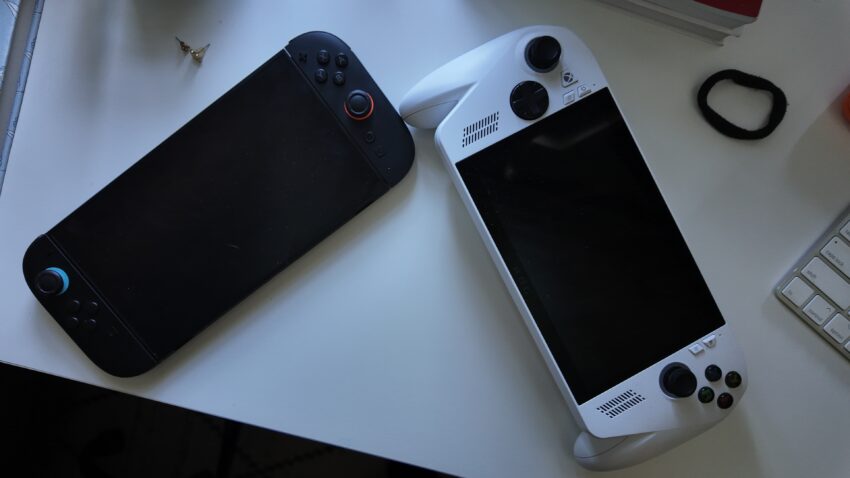
For a time, the SteamDeck dominated the Gaming PC portable scene, but competition is fierce now on that space with many more powerful, and some even more affordable choices at hand. The portable gaming space as a whole has been ruled by Nintendo since … 1989. The SteamDeck did little to change that, but it offered gamers a powerful alternative to play top console games on the go.
Xbox jumped into the fray with an ASUS collaboration late last year, and offer us two options: a Budget friendly – Some slightly more powerful than the Steam Deck – White Xbox Rog Ally ($499 but currently $599) and a more powerful Black Xbox ROG Ally X which these days costs about $999.
It is – given the current climate of overpriced hardware – the White Xbox Rog Ally which is the most attractive PC handheld device around for the economically challenged. As Valve has priced out the underpowered Steam Deck ($789!?) even further above the recent augmented prices for a new Xbox Rog Ally.
The Nintendo Switch 2, however, is priced at $499 which makes the most attractive handheld gaming machine of all purely when it comes to price.
So, it is clear then that the only PC Handheld that is left to compete with Nintendo’s king of portables is the Xbox Rog Ally, since they are more or less within the same price range.
I played with both systems for about year now (a year and half for the Nintendo Switch 2), and here is my verdict.
Outer Hardware Quality and What Each Handheld Gives you Out of the Box
Build Quality
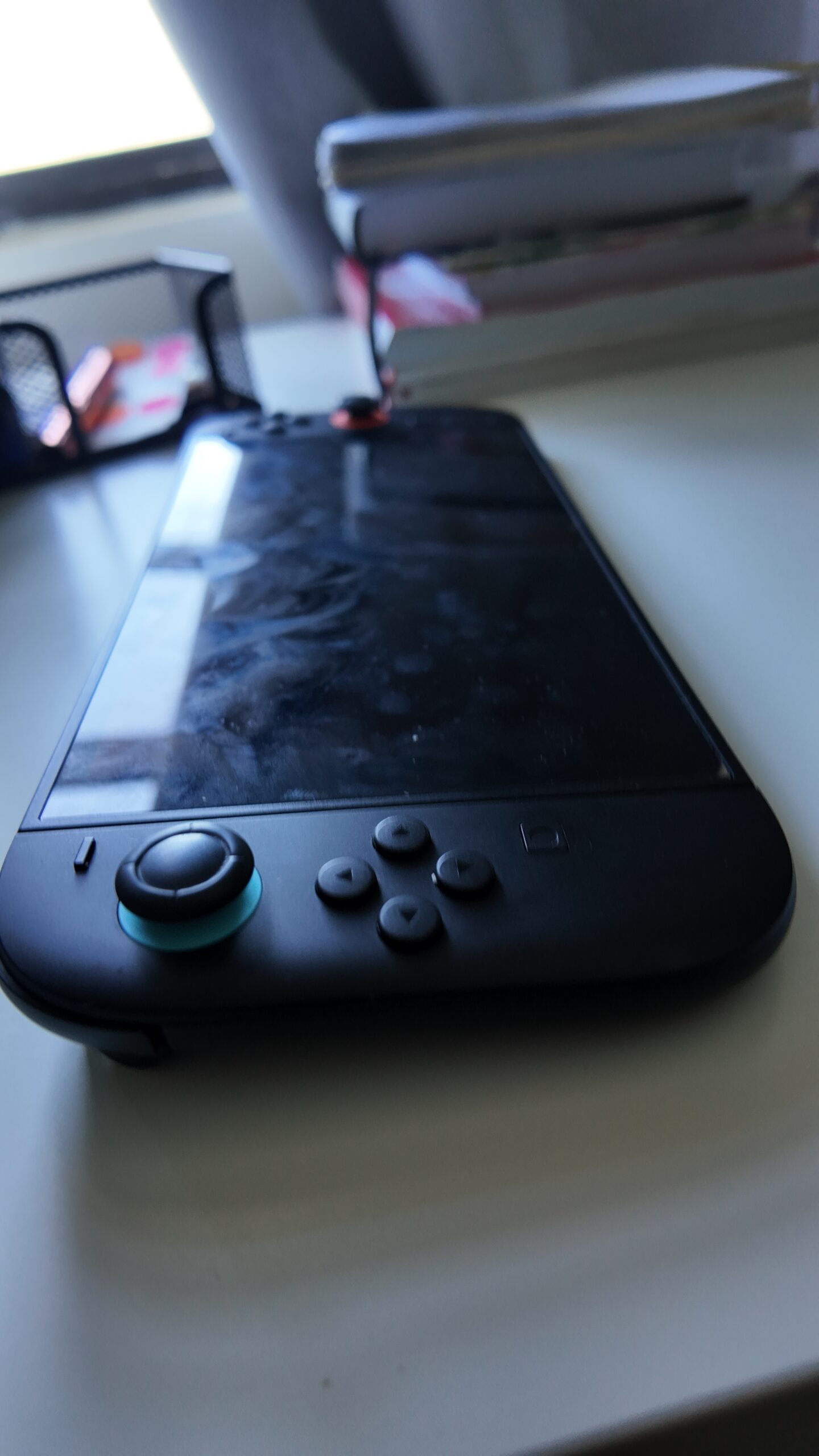
Nintendo Switch 2: The original Switch was a bit flimsy and felt somewhat cheap in the hands. I cracked the plastic of a joy con once (in the rear) pulling out of its railing. The joy con continues to work, and so does the Switch after nearly a decade of use. Nintendo – as usual – built a ‘clumsy child proof’ machine. The Switch 2 is a lot sleeker than the original, and with a full black matte finish, it looks more like high tech device than a portable Nintendo machine.
The device also feels much sturdier and the plastics are of a higher degree of quality. The screen has an embedded “plasticky cover” that is easily scratched, but the joy cons feel better than before, and the magnets – as opposed to the flimsy rails of the original Switch – work very well most of the time.
During my portable sessions, I did find that depending on how I held the device and the pressure I used to grab the system – some times – the joys cons would lose their connection prompting me to de-attach and re-attach them quickly before resuming play. This wasn’t an issue for the first year or so of use, but it has become a somewhat prevalent thing over last few months.
This doesn’t seem to happen when Switch 2 is docked, and the JoyCons are attached to the controller device that comes with the Nintendo Switch 2. So, while the magnet system is superior and more sophisticated to the rail system, the durability of such a system remains a question mark for me.
The good news? I can buy new (very pricey) joy cons without having to replace the system if they were to fail at some point.
The bottoms and joy sticks are sturdier than before. After a year of heavy use, I have yet to run into any drift issue, and the buttons look like the wall hold up at least for another decade.
The integrated stand is also wider and stronger (unlike the original’s) and Even the Dock finally looks like a well thought out product as opposed to an after thought. The JoyCons have Haptic rumble (much more capable and nuanced than that of the Xbox ROG Ally’s), gyroscope sensors, mouse/pointer, and motion features. The Switch 2 also features a surprisingly good Microphone integrated into the tablet.
The new charger has a separate USB C cable from the power supply, and the system come with a proper Ultra High Speed HDMI 2.1 Cable that will allow for 4k at 120hz gameplay right out of the box. You get a lot of value from a $500 price point right out of the box with this machine
The Speakers’ quality is pedestrian, especially when stacked up against the ROG’s loudness and clarity. The tablet can heat up somewhat – never as much as the ROG – but it is quite quiet – much quieter than the Xbox ROG Ally – which is fairly quiet to begin with as well.
The Nintendo Switch 2 uses less wattage than the Xbox ROG Ally, even while delivering a better gaming experience in comparable games, which an NVIDIA/Nintendo miracle to say the least.
Xbox Rog Ally: The ROG is much thicker, and feels slightly lighter (hollower given its thickness) despite being actually heavier (1.5 lbs to Switch 2’s 1.18 lbs). Because of this, the Xbox ROG Ally feels like its White – easily stainable with use – plastic would crack up quicker if it fell on hard floor than the Switch would. Given that both machines initially cost me $1,000 (combined) I won’t test this theory just for the sake of science.
But yes! I would fear more greatly for the ROG if it fell than I would for the Switch 2.
The ROGs screen is of higher quality (more on this later), and it has Gorilla glass. What this is means is that the ROG Ally’s screen is un-scratch-able under normal circumstances. It would take an effort to scratch the screen up, but it is also quite breakable under a fall (as opposed to the plastic Switch Screen). So…don’t drop your ROG!
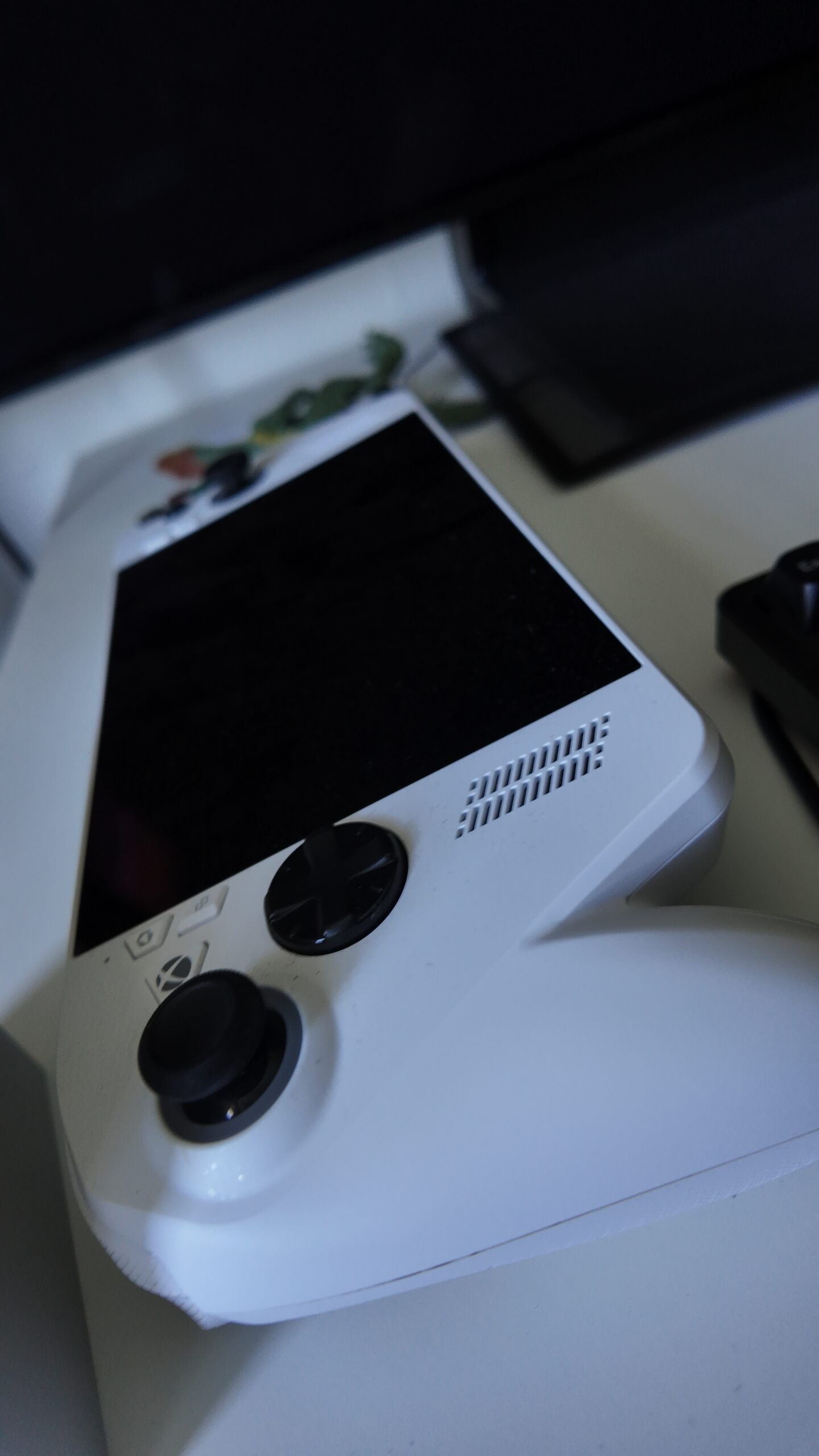
When it comes to buttons and grip feel, the grip in the Xbox ROG Ally feels better on larger hands than the Switch 2 does. It is for all intents and purposes a carbon copy of the Xbox Series control’s grip, complete with the same button, and trigger layout. It is like “playing on Xbox” when it comes to control…save for one caveat. ASUS continues to use the same plastics and materials from their line of ROG Allys on the Xbox iteration of the machine. The quality hard plastics of the Xbox controllers are missing here, the high end clicky feel of buttons is lessened as well, and the triggers feel a lot flimsier than they do on the Xbox Series line of controllers. The less said about the D-Pad the better.
The Bad News? Unlike the Switch 2 removable controllers, if a button or Stick goes to the gutter here, you will have to open up the system and fix it yourself, or you will have to replace the entire unit.
Because the Xbox ROG Ally is larger PC Device that tries to integrate the Xbox Controller’s ergonomics into a handheld – along with its white color – the system, in the ultimate irony of ironies, looks more like a children’s toy/video game machine than the sleeker Nintendo Switch 2 does.
The Xbox ROG Ally, despite being $100 more expensive than the Switch, gives you nothing out of the box. There is no HDMI cable, or adapter for TV play, only a very good USB C power supply, and a card board – yes cardboard – stand that my wife mistook for trash and threw it away never to be seen again. For such an expensive device, couldn’t have ASUS afforded to give us a proper plastic stand?
Winner: The Switch 2
The plastics, buttons, features, and in the box components all feel more premium than the Xbox ROG Ally’s counter parts. Aside from the Screen and Speakers, the Switch appears to be a much better constructed forward looking device.
Screen Quality
Spec Comparison:
| Feature | ROG Xbox Ally / Ally X (2025) | Nintendo Switch 2 (2025) |
|---|---|---|
| Screen Size | 7.0 inches | 7.9 inches |
| Panel Type | IPS LCD | Wide-gamut LCD |
| Resolution | 1920 × 1080 (314 PPI) | 1920 × 1080 (279 PPI) |
| Refresh Rate | 120Hz with VRR | Up to 120Hz with VRR |
| HDR Support | None | HDR10 |
| Peak Brightness | 500 nits | Not officially specified |
| Glass & Coating | Gorilla Glass Victus + DXC anti-reflection | Standard glass touchscreen |
Nintendo Switch 2: The Switch 2’s has one clear tangible advantage: Size. That extra .9 inches gives the Switch 2 a better feel (that’s what she said!) than the Xbox ROG Ally while playing both up close, and at a reasonable distance while on its “stand” mode. No one has ever complained about a bigger screen…ever.
However, the screen is laggy – noticeable on faster 2-D experiences – and less crisp than that of the ROG’s. It is also, due to the protective coating used, easily scratched (even when kept in an official case) though a lot more resistant to actual falls to the ground – which was likely Nintendo’s biggest concern – than the Xbox ROG Ally’s.
The screen has a larger ranger of contrast than the original Switch’s LCD. The Blacks are deeper now, and it just looks better, and yet, I am not entirely convinced of Nintendo’s HDR 10 claims…I see no advantage on that area over the IPS LCD on the ROG. If the screen is capable of HDR10, it is likely a very cheap and rudimentary version of it. The screen doesn’t have the peak brightness (or dimming) to really implement this technique.
Xbox ROG Ally: This is – by far – the better LCD here (and way superior to the SteamDeck’s LCD). It is crisper, sharper, and faster. It appears to have a higher peak brightness and the screen is super scratch resistant. Yes, it will break if it falls, but just like with our guns…we do not drop our handhelds…do we?
Winner: Easy win for the Xbox ROG Ally here. A word of caution, both screens are incredibly dark during broad daylight sessions. Of course this varies by game, some of Nintendo’s brighter stuff will be easily seen, but the darker more realistic games like the Witcher 3, Ocarina of Time, and Crimson Desert are nearly unplayable outdoors.
Specs (Power)
|
GPU specification |
Xbox Ally Z2 A |
Switch 2 |
|---|---|---|
|
GPU manufacturer |
AMD |
NVIDIA |
|
Architecture |
RDNA 2 |
Ampere |
|
GPU cores |
8 Compute Units and 512 Stream Processors |
12 SMUs, and 1,536 CUDA cores |
|
GPU clock |
Up to 1,800 MHz |
561 MHz handheld |
|
GPU clock (docked) |
N/A |
1,007 MHz |
|
Theoretical GPU power |
Approx. 1.84 TFLOPS |
Approx. 1.71 TFLOPS handheld |
|
Theoretical docked GPU power |
N/A |
Approx. 3.07 TFLOPS |
|
Ray tracing |
No hardware RT acceleration |
Yes |
|
Upscaling |
AMD FSR |
NVIDIA DLSS |
|
Memory |
16GB LPDDR5X |
12GB LPDDR5X |
|
Processor (SoC)
AMD Ryzen Z2 A |
Processor (SoC)
Custom Nvidia Tegra T239 |
|
CPU Architecture
x86-64 (AMD Zen 2) |
CPU Architecture
64-bit ARMv8 (ARM Cortex-A78C) |
|
Cores & Threads
4 cores / 8 threads (SMT) |
Cores & Threads
8 cores / 8 threads (no SMT) |
|
Usable Game Cores
All 4 cores / 8 threads (shared with Windows) |
Usable Game Cores
6 cores (2 cores locked to OS) |
|
Clock Speed
2.8 GHz base / up to 3.8 GHz boost |
Clock Speed
1,101 MHz (handheld) / 998 MHz (docked) |
|
Cache
2 MB L2 + 4 MB L3 (6 MB total) |
Cache
2 MB L2 (256 KB × 8) + 4 MB shared L3 |
|
Power Envelope (TDP)
6W – 20W (adjustable) |
Power Envelope (TDP)
Ultra-low power (mobile console envelope) |
Nintendo Switch 2: The Switch 2, due to its newer architecture, has a slight advantage while on handheld mode, but a very clear advantage when playing docked. NVIDIA’s DLSS is major game changer that has allowed the Switch 2 to even out perform the Xbox Series S in certain game comparisons. The Switch 2 can go blow for blow (and sometimes better) on handheld mode than the ROG, and at a lower wattage, so you get about 30 minutes of more gameplay – battery – time in certain games (such as Elden Ring).
Nintendo Switch 2’s lower RAM GB count – perhaps what has allowed Nintendo to keep the machine’s price down – is misleading as well. Windows, even through the use of the “Xbox App” hugs more RAM than Nintendo’s OS. In theory, both have a similar RAM ceiling when playing games.
The Switch 2’s only weakness lies on its CPU. It is slower than the ROG’s and it is the reason why say… a GTA VI port would be challenging for the system.
The New Witcher 3 Next Gen Remaster, looks a bit blurry while utilizing VRR to maintain a smooth fluid frame rate in handheld mode. In this mode, thanks to DLSS, it however offers a sharper image than Xbox ROG Ally can muster at similar frame rates. This all changes when docked.
In Docked Mode the Switch 2 is clearly the superior machine, and performer. The Switch 2 is ever capable of Ray Traced features (something the ROG is not).
The Switch 2 will always have a major advantage over the similarly spec’d up Xbox ROG Ally: Targeted Optimization.
By the time this article rolls around, the Switch 2 will have sold nearly 30 million units around the world. That number easily destroys – several times around – the global number of PC Handhelds sold – life time wise. What that means is that developers will target the device with ports of popular AAA games, and these ports will have major optimizations that target the specific hardware.
What does this mean? When the announced Crimson Desert Switch 2 version rolls around, it will likely look and run better on Switch 2 (handheld mode) than it does on the Xbox ROG Ally. It is just the nature of the beast. The system is too popular to avoid, and developers will target the machine.
Xbox ROG Ally: The Xbox ROG Ally is basically a SteamDeck – on overdrive – thanks to its higher allowed TDP usage. What this means is that it will run PS4/Xbox One Era games with no issues, and even better performance/settings at times. What this also means is that it will run modern PS5/XBOX Series games with some struggles and visual compromises.
I tested my Xbox ROG Ally with 2026’s Crimson Desert. A highly demanding game, that looks terrible on Series S, and pushes the X and base PS5 around.
The Good News? The Xbox ROG Ally can run it- in playable form.
The Bad News? Define what “playable” is to you.
I got anywhere from 18-25 FPS with moderate to low visual settings. It is not stable, but it is playable. I never managed to get a stable 30 fps on the game, no matter what low settings I used. Poorly optimized UE5 games will run similarly bad – or worse – Beast of Reincarnation is effectively broken in the handheld (at least it was a few months ago).
As a PC device, the Xbox ROG Ally relies on the scalability of games, as opposed to developer targeted optimization .
Just something to keep in mind. Thanks to VRR, however, older titles like Elden Ring, ran like a champ with decent visual quality.
The FSR 4.1 Factor
Recently RDNA 2 handhelds got the update. Still, some important games (such as Crimson Desert) have yet to utilize the technique on the base Xbox ROG Ally. So, so far, it is a hit or miss thing. But if more developers support the feature on RDNA 2 based handhelds, the Nintendo Switch 2’s DLSS advantage might not be such a big difference maker any more.
Winner: The Switch 2. It will be a bullet proof system for years to come as developers will continue to target the hardware. In handheld mode it is a tied race, but docked mode on Switch 2 offers significant advantages, and again, the system will get optimized ports of future AAA games, while you will have to try your luck tinkering with settings on the Xbox ROG Ally to get “playable results” in the more demanding titles.
Games
Nintendo Switch 2: Nintendo’s top notch Library of Classics, and back log of Switch 1 titles (with sometimes significant image and performance improvements) is here. You also get Nintendo’s new stuff such as The Legend of Zelda Ocarina of Time Remake.
The system being a high/quick seller is also getting monster AAA ports such was Resident Evil Requiem on a quick consistent basis. These are optimized ports for the system that are at times competitive with Series S versions of the game.
What are you are missing here – for the most part – are many last generation classics, and Sony’s PC library of games. Example: Dark Souls 2 and 3.
While you can play those games with decent performance and great visuals on the Xbox ROG Ally, these titles are missing from the Switch 2 library…and it is unclear if we will ever get ports. We might – someday – of Dark Souls 3. But the more obscure Dark Souls 2 will likely never get a port.
If thats important to you, then the ability to buy games (0ften times on sale) on Steam Library might make the Xbox ROG Ally a more attractive option.
Xbox ROG Ally: You have the ability to buy from Microsoft Store, Steam, and others. You get access to most of the Xbox classics, some Sony first party stuff, and pretty much any game imaginable that is not made by Nintendo. This includes the ability to use mods (if you wan to explore that kind of thing). You would only be missing Nintendo’s all time great games…but sometimes you just can’t get everything you want.
Winner: The Xbox ROG Ally. The library of titles is too vast, and often times on discount prices. However, if you are a Zelda/Mario nut like me, then the Switch 2 wins this one.
Considerations To Take Into Account
Nintendo Switch 2: This is a true gaming machine. Its design, OS, all of its features are tailor made for gaming, and gaming only. What this means is that the ability to switch from a big screen to the handheld screen in a second, to transition from game to game, and from sleep mode to game mode is seamless.
It is a true “plug and play” machine with a curated experience tailor towards gaming. No constantly long updates, no game crashing, no missing saves. It is handheld/home hybrid console to the end. It even updates while it is sleeping.
Xbox ROG Ally: As a console gamer, I was rattled by the massive amount of updating needed to get the system running out of the box. I had to open steam accounts, Ubisoft accounts, etc. It was truly an epic hassle. If you don’t have a stable internet connection – forget it – you will hate the initial experience.
The Xbox App alleviates some of the Windows 11 issues, but it remains a Windows machine, and it pales in comparison to both the true Xbox console experience and Nintendo’s own very streamlined Switch 2 OS system.
You have to update AMD drivers, Armory Crate, Xbox App, Windows, etc. These updates happen in a weekly, sometimes daily basis. I can’t just simply turn on the machine and play within seconds. It takes minutes, sometimes 20 or more depending on how much I have to update, and whether a game crashes, freezes, and just simply takes forever to load up (compile shaders) before I get to start screen. Even during game play, the game can simply just crash (has happened with both Crimson Desert, and Elden Ring) for no apparent reason.
Forget about hitting the sleep button – which is a major Switch 2 convenience feature while playing portable – trying to resume gameplay can induce crashes, freezes, and even decreased performance if the game miraculously resumes playing.
It is a hassle. It is a PC.
Yes, the system can double as a workstation for any project, just like a PC, but it falters greatly when it comes to gaming quality of life. If you don’t have a proper PC or Laptop, investing in this machine might help you through college courses, or even jobs (thought in that case I would update to the 2x pricier Xbox ROG Ally X which has a better CPU/GPU/RAM combination).
Not all is negative though…
Xbox Play Anywhere Advantage
Why Microsoft hasn’t marketed this thing to no end…baffles the mind. But yes, if you own an Xbox Series console, the Xbox ROG Ally basically functions as a “Switch”… of sorts. A big reason why I bought the Xbox Series X’s Crimson Desert version – as opposed to the PS5 – is the ability to freely download the PC version of that game on any PC device – including our subject Xbox ROG Ally – and play with the same save while out of home. It is a major attractive feature of the handheld machine and Xbox itself.
This feature alone has made the device a necessity for me. Other new games such as The Blood of the Dawnwalker also support this feature.
Winner: Switch 2 is the only seamless gaming experience here. However, if you are Xbox lifer, and own an Xbox Series X/S console, the Xbox ROG Ally might be worth your time thanks to the “Xbox Play Anywhere” feature. It doubles as an Xbox with – PC/Windows – hassles.
Which One Should You Buy?
Do you want a seamless gaming portable gaming experience with resolution and performance gains while docked on your TV? Do you want some of the greatest games of all time at your finger tips? All of these things for $100 less? Then the Switch 2 is your machine. It is by most metrics the better gaming machine. It is the only thing that it does.
Do you own an Xbox or a Gaming PC? Do you want to take part of your Xbox, and all of your PC library on the road to play on the go? Do you want a mini workstation for other projects? Then Xbox ROG Ally is your machine.
Keep in mind, that long time console gamers will find the Xbox ROG Ally experience a bit jarring given the hassles required to get it to play a game – at times – but for the most part, I have enjoyed my time with the Ally, and I look forward to continue playing 20-25 fps Crimson Desert in it. That said, my time has been largely spent mostly on my Switch 2, because it is such an easy machine to pick up and play and carry around. Obviously, Ocarina of Time Remake is responsible for much of this, but still, I do prefer the Switch 2 as a gaming machine.
In a perfect world, we should have both machines, but if you only must choose one, I would choose the Nintendo Switch 2. It does not only offer a seamless gaming experience but it can also double as portable multiplayer gaming station of you have kids.